Help Help, opens a new window
AdminAdmin settings
Log In / My HPL
  • Log In / Register
  • My Library Dashboard
  • My Borrowing
  • Checked Out
  • On Hold
  • Borrowing History
  • Fees
  • ILL Requests
  • My Collections
  • For Later Shelf
  • Completed Shelf
  • In Progress Shelf
  • Lists
  • My Events
  • My Profile
  • My Settings
Hamilton Public Library
Main navigation
Open search form
Search by
    Saved Searches Advanced Search

    Search

    Search by
      Saved Searches Advanced Search
        • Recent Activity
        • New Titles
        • Awards
        • Bestsellers
        • Staff Picks
        • eBooks and eAudio
        • Magazines and Newspapers
        • Movies and Music
        • Do It Yourself
        • Research and Reference
        • Health and Wellness
        • Business
        • Jobs and Careers
        • Available Now
        • Featured Titles
        • Fiction and Non-Fiction
        • Express
        • eReads for Teens
        • eReads for Kids
        • Languages Other than English for Kids
        • Magazines
        • NewsPapers
        • New York Times
        • Read alouds for K-6
        • More eReads
      • Online Payment
      • Maintenance Schedule
      • Branch Hours
        • General Inquiry
        • Local Author Submissions
        • Book Club Kits
        • Interlibrary Loan
        • Suggest for Purchase
      Home > Catalogue "My Shelves" Private Feature

      Catalogue "My Shelves" Private Feature

      HPL card holders have the option to make their My Shelves (For Later, Completed and In Progress) titles private.
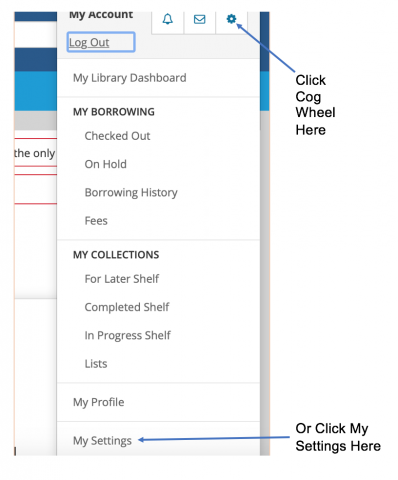
      Catalogue my account settings
      Figure 1

      To do so, log in to your account. In the top right corner where your user name appears, choose the cog wheel (beside the envelope symbol) or scroll down to My Settings. (Figure 1)
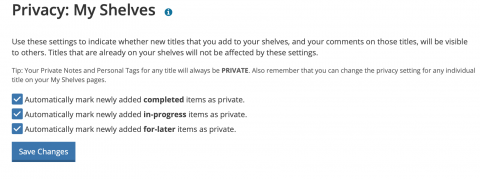


      Catalogue my account privacy settings
      Figure 2

      Then, scroll down to Privacy. Where it says My Shelves click on Change. Three boxes appear indicating which feature you would like to make private: For Later, Completed and In Progress. Click on the ones you would like to make private. Then click Save Changes. (Figure 2)

      If you need assistance to update your settings, please call (905) 546-3200 or contact us via Online Chat.

      • HPL Sites
        • Hamilton Public Library
        • HPL Kids
        • HPL Teens
        • Local History and Archives
        • Love Your City – Share Your Stories
        • ExperienceCommons
        • Red Book by HPL
      • HPL Online
        • eBooks & Audio
        • Magazines and Newspapers
        • Movies and Music
        • Learning at HPL
        • Do It Yourself
        • Health and Wellness
        • Research and Reference
        • Business
        • Jobs and Careers
      • Programs
        • Program Guide
        • eNewsletter
      • Services
        • Book an Appointment
        • Newcomers
        • Home Library Service
        • Accessibility
        • Rooms
        • Public Computers and Wi-Fi
        • Add Funds to Your Library Card
       YouTube  Pinterest  Twitter  Facebook  Instagram  Adjust Contrast
      • AODA
      • Privacy Policy

      © 2026 Hamilton Public Library. All rights reserved.
      Magazines Movies eBooks and eAudio Borrowing Policies Collections Policy Contact Us
      Privacy Statement Terms of Use Accessibility Statement